


.svg)
.svg)
.svg)
.svg)
.svg)
.svg)
.svg)
.svg)
.svg)
.svg)
.svg)
.svg)
.svg)
.svg)
.svg)
.svg)
.svg)
.svg)
.svg)
.svg)
.svg)
.svg)

Paubox Email API customers can now start a dynamic template from a gallery of prebuilt designs. Six ready-made templates are available to get started.
What's happening
Last month we added dynamic templates to the Paubox Email API dashboard, so you could build and manage reusable email layouts without writing code. Customers asked for a faster way to get started.
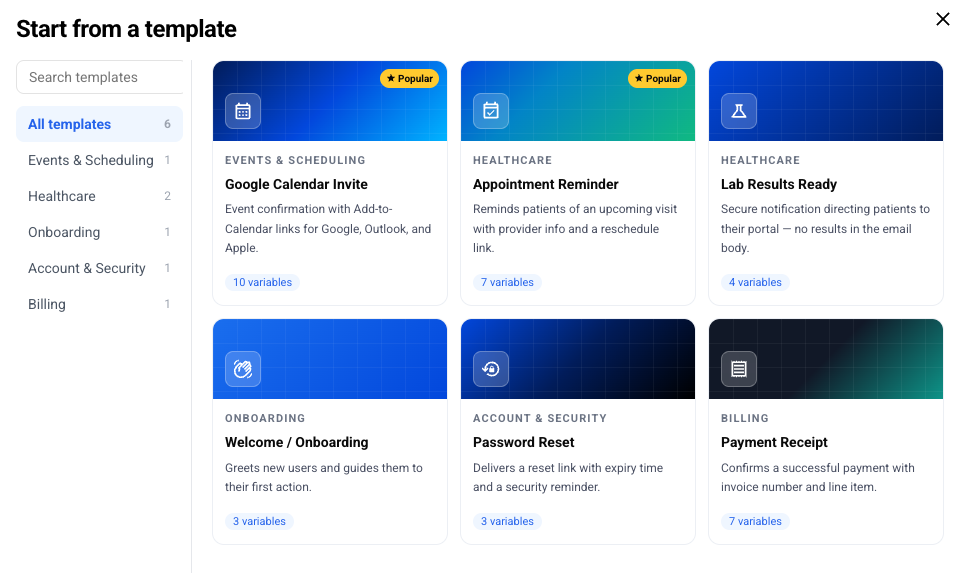
We now have pre-built dynamic templates that you can preview, customize, and save. Templates include: Google Calendar Invite, Appointment Reminder, Lab Results Ready, Welcome/Onboarding, Password Reset, and Payment Receipt.
How it works
Go to Paubox Email API → Dynamic Templates and select Browse gallery. Filter by category in the sidebar, or search by name. Select a template to see a live preview that renders with realistic sample data, so you know what the finished email looks like before you commit. When you find one you like, select Use this template. The name and full HTML body drop into the New Template form. Edit what you want, then select Create Template to save.
For example, suppose you send lab results notifications. Start from the Lab Results Ready template, adjust the copy and variables to match your app, and save. The template is ready to send through the Email API right away.
Included with the Paubox Email API
The template gallery is included at no additional cost for Paubox Email API customers. Templates you create from the gallery work the same as any template you build yourself.
Customer feedback is part of the Paubox Foundations. You asked for an easier starting point, so we built it.
Read the quickstart guide to get started with Paubox Email API.
