


.svg)
.svg)
.svg)
.svg)
.svg)
.svg)
.svg)
.svg)
.svg)
.svg)
.svg)
.svg)
.svg)
.svg)
.svg)
.svg)
.svg)
.svg)
.svg)
.svg)
.svg)
.svg)

Paubox has added template management and creation to the Paubox Email API dashboard. Developers and their teammates can now build, edit, and organize dynamic email templates in the UI, with no file upload and no code. Templates created in the dashboard work with the Email API immediately.
What's happening
Customers asked for an easier way to manage templates. Until now, creating or updating a dynamic template meant working through the API. That put routine edits, like fixing a typo in a receipt email or spinning up a new notification layout, on the engineering team.
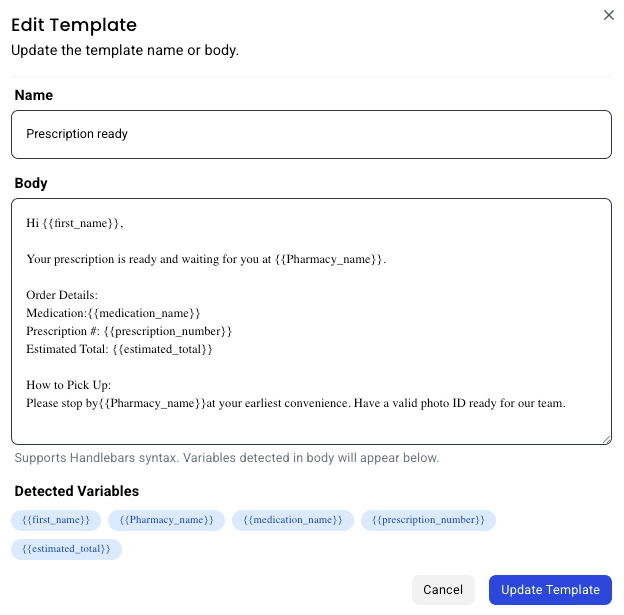
Now anyone with dashboard access can do it. For example, suppose your team wants a "prescription ready" email with the patient's name, pharmacy, and order details. They can build it in the dashboard, name it, and have it ready to send through the API in minutes.
How it works
Go to Paubox Email API > Dynamic Templates and select New Template. Give the template a name and enter your email body as HTML. Use anywhere you want a value filled in at send time.
As you type, a Detected Variables panel shows each variable it finds, so you can confirm every merge field is captured before you save.
Your templates live in a searchable, sortable table. Each row has a menu to edit, duplicate, or delete. Duplicate creates a "Copy of" version you can change without touching the original.
Changes take effect immediately. A template you save in the dashboard sends through the Email API the same as one created through the API.
Learn more about managing and creating dynamic templates in the dashboard.
Included with the Paubox Email API
Template management in the dashboard is available to all Paubox Email API customers at no additional cost.
Read more: Send emails with the Paubox CLI
