


.svg)
.svg)
.svg)
.svg)
.svg)
.svg)
.svg)
.svg)
.svg)
.svg)
.svg)
.svg)
.svg)
.svg)
.svg)
.svg)
.svg)
.svg)
.svg)
.svg)
.svg)
.svg)


AI app builders like Lovable, Replit, Bolt, and v0 can turn a plain-English description into a working app over a weekend. None of them offers a business associate agreement (BAA), the contract HIPAA requires with any vendor that stores or handles patient information for you, that covers its AI app-building tools on a self-serve plan, and several bar patient data in their terms.
So a prototype built this way is fine for testing with made-up data. If you've built an intake form, scheduling tool, or patient portal this way, ask yourself one question: does it hold a real patient's name, birthday, or health details today?
Why a BAA decides where patient data can live
HIPAA treats any company that stores patient information for you as a business associate. The HHS Office for Civil Rights says that applies to a cloud provider "even if the CSP processes or stores only encrypted ePHI and lacks an encryption key for the data," according to its guidance on HIPAA and cloud computing.
That means every service your app uses to store or send patient data needs a BAA, including the database, file storage, and whatever sends your emails or texts. The rule also reaches the companies those vendors rely on, which federal regulations call subcontractors.
What the app builders' terms say
None of these builders publishes a BAA that covers its AI app-building tools on a self-serve plan, and three of them bar patient data in their terms. Vercel sells a BAA for hosting, but its AI services still can't process patient data. We checked each platform's own terms and documentation on October 13, 2026. Terms change, so check again before you build:
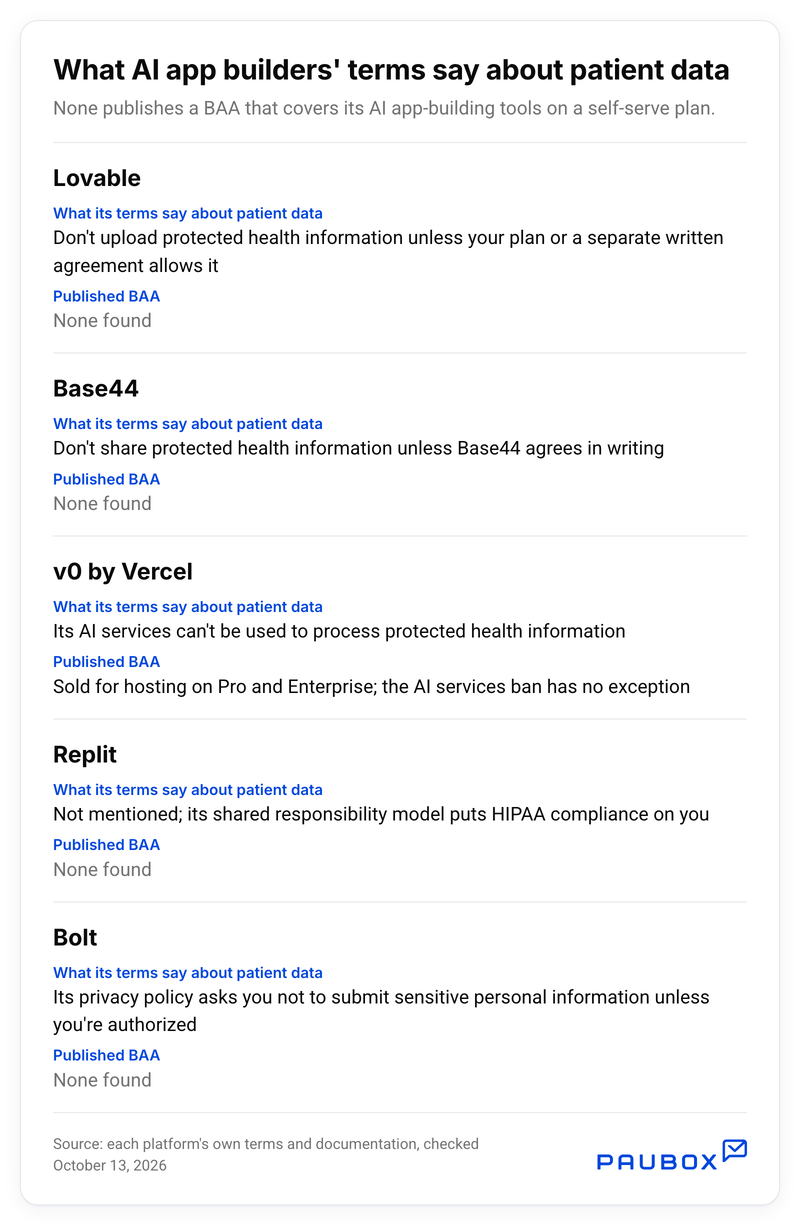
Sources: Lovable terms, Base44 terms, Vercel acceptable use policy, Vercel compliance, Replit shared responsibility model, Bolt privacy policy
Many of these builders also connect your app to a database service called Supabase. Supabase's terms don't allow patient data without a signed BAA, and its pricing offers one only as a paid add-on on its higher-priced plans, not on the Free or Pro plans most prototypes start on.
Plan the move before the first patient record
If your app already holds real patient data, stop adding more, and start with steps 2 and 3 today.
The step that's easiest to skip is moving the prototype onto services that will sign a BAA. Do it before launch, while no patient has used the app yet:
- Build and demo with made-up data only, and keep real patient details out of what you type into the AI builder too.
- List every place the app sends or keeps information, including the database, uploaded files, forms, and email or text notifications.
- For each one, get a signed BAA or switch to a service that will sign one.
- Turn on the security settings each new service lists for HIPAA projects. If someone else built the app, they'll know where those settings are.
- Decide who will look after the app after launch, because the person who built the prototype may not be the one who keeps it compliant.
For a fuller walkthrough, see Paubox's guide to building with AI in healthcare.
Two pieces you don't have to rebuild
Most healthcare prototypes collect information from patients and send messages back to them. Paubox covers both with a BAA.
For messages, the HIPAA email API encrypts every email by default and includes a BAA on every plan, including the free plan. That's what "Start for free" below gets you.
For patient forms, HIPAA compliant forms from Paubox handle intake, consent, file uploads, and e-signatures, and they're included with any paid Paubox plan. You can also describe the form you need to an AI assistant connected to your Paubox account, and it puts a draft in Paubox Forms for you to review before publishing.
