


.svg)
.svg)
.svg)
.svg)
.svg)
.svg)
.svg)
.svg)
.svg)
.svg)
.svg)
.svg)
.svg)
.svg)
.svg)
.svg)
.svg)
.svg)
.svg)
.svg)
.svg)
.svg)


When you manage communications for multiple customers, such as healthcare practices, clinics, or partner organizations, you may need to send branded emails on their behalf from your own domain.
With Paubox Email API, you can securely send messages that include each customer’s unique logo in the message body while using a consistent sending domain.
This guide walks you through how to do it with the REST API using a simple Node.js example.
Paubox also offers an SMTP API, and with a few small changes, you can accomplish the same thing using that method as well. However, the information in this article focuses on the REST API.
Overview
In this guide, you’ll learn how to:
- Upload customer logos to a secure hosting location (like AWS S3 or another CDN).
- Store customer data, including each customer’s display name and logo URL.
- Send branded email using the Paubox REST API with the correct customer logo displayed in the message body.
1. Upload customer logos
Before sending any email, you’ll need to upload each customer’s logo to a location that can be accessed publicly via HTTPS. Email clients will load the logo image directly from that URL, so it must be hosted securely and reliably.You can use any trusted content delivery network or file host, such as:
- AWS S3
- Cloudflare R2
- Google Cloud Storage
- Akamai Object Storage
- Or any other HTTPS-accessible CDN
Once uploaded, make note of each logo’s URL. You’ll use those URLs later when constructing your HTML message.
2. Environment configuration
First create a .env file in your project directory to store your Paubox Email API credentials:
API_Key=your-email-api-key
API_USERNAME=you=email-api-username
Your Paubox Email API credentials can be found in your Paubox Dashboard under Paubox Email API → Settings.
These values will be loaded by the dotenv package when the script starts.
3. Imports and customers object
You’ll now reference the customer logo URLs you uploaded in Section 1 when defining your customer data. This data will be used later by the script to personalize each message. You can store customer information in your app or a database. We'll use an in-memory JavaScript object in the example below:
require('dotenv').config();
const axios = require('axios');

const customers = {
  acme: {
    customerName: "Acme Health",
    logoUrl: "https://i.ibb.co/8/wwwPx/acme-health-nopadding.png"
  },
  brightpath: {
    customerName: "BrightPath Therapy Group",
    logoUrl: "https://cdn.example.com/brightpath.png"
  },
  clearview: {
    customerName: "ClearView Eye Center",
    logoUrl: "https://i.ibb.co/RkttBKxW/clearview-eye-center.png"
  },
  northwell: {
    customerName: "Northwell Wellness",
    logoUrl: "https://i.ibb.co/mVpHbdr7/northwell-weUlness.png"
  },
  zenclinic: {
    customerName: "Zen Clinic",
    logoUrl: "https://i.ibb.co/CKd5zQb3/zen-clinic.png"
  }
};
You’ll use this customers object in the next section when constructing and sending emails with the Paubox REST API.
4. Render HTML
Now we'll add a function to render the email's HTML:
function renderHtml({ customerName, logoUrl, bodyhtml }) {
  return `
  <html>
  <body style="margin:0; padding:0; font-family: Arial, sans-serif; color:#111;">
    <table role="presentation" width="100%" cellpadding="0" cellspacing="0" border="0"
      style="border-collapse: collapse; mso-table-lspace:0pt; mso-table-rspace:0pt;">
      <tr>
        <td align="left" valign="top" style="padding:0; margin:0; line-height:0;">
          <img src="${logoUrl}" alt="${customerName} logo"
            width="180" style="display: block; height:auto; border:0; margin: 0; padding:0;" />
        </td>
      </tr>
    </table>

    <div style="padding:0 16px;">
      ${bodyhtml}
      <hr style="margin-top:24px; border:0; border-top: 1px solid #eee;" />
      <p style="color:#6b7280; font-size: 12px;">
        This message was sent securely on behalf of <strong>${customerName}</strong>.
      </p>
    </div>
  </body>
</html>`;
}
Next, we'll add a function to send the email to the selected customer.
async function sendCustomerEmail(customerKey, recipient) {
  const customer = customers[customerKey];
  if (!customer) throw new Error(`Unknown customer: ${customerKey}`);

  const { customerName, logoUrl } = customer;

  const htmlBody = `
  <p>Hello,</p>
  <p>Thank you for your recent visit with <strong>${customerName}</strong>.
  We appreciate the opportunity to support your health and wellness.</p>
  <p>If you have any questions or need to schedule another appointment, feel free to reach out to our team.</p>
  <p>Warm regards,<br>The ${customerName} Team</p>`;

  const textBody = `Hello,

Thank you for your recent visit with ${customerName}.
We appreciate the opportunity to support your health and wellness.

If you have any questions or need to schedule another appointment, feel free to reach out to our team.

Warm regards,
The ${customerName} Team`;

  const subject = `A message from ${customerName}`;
  const html_content = renderHtml({ customerName, logoUrl, bodyhtml: htmlBody });

  const url = `https://api.paubox.net/v1/${process.env.API_USERNAME}/messages`;
  const headers = {
    'Authorization': `Token token=${process.env.API_KEY}`,
    'Content-Type': 'application/json'
  };

  const data = {
    data: {
      message: {
        recipients: [recipient],
        headers: {
          from: 'Appointments Team <noreply@paubox.tvs>',
          subject: subject
        },
        content: {
          'text/plain': textBody,
          'text/html': html_content
        }
      }
    }
  };

  const res = await axios.post(url, data, { headers });
  console.log('Sent:', res.status, res.data);
}
5. Example usage
Finally, we will send an email to a selected customer. Two examples for different customers are illustrated below:
// Example usage - send from customer Acme Health
sendCustomerEmail('acme', 'recipient@example.com').catch(err =>
  console.error('Error:', err.response?.data || err.message)
);

// Example usage - send from customer Clearview Eye Center
sendCustomerEmail('clearview', 'recipient@example.com').catch(err => {
  console.error('Error:', err.response?.data || err.message);
});
When your script runs successfully, recipients will receive a branded, secure email personalized for each customer.
Here's how the emails we sent look in the recipients' inbox:
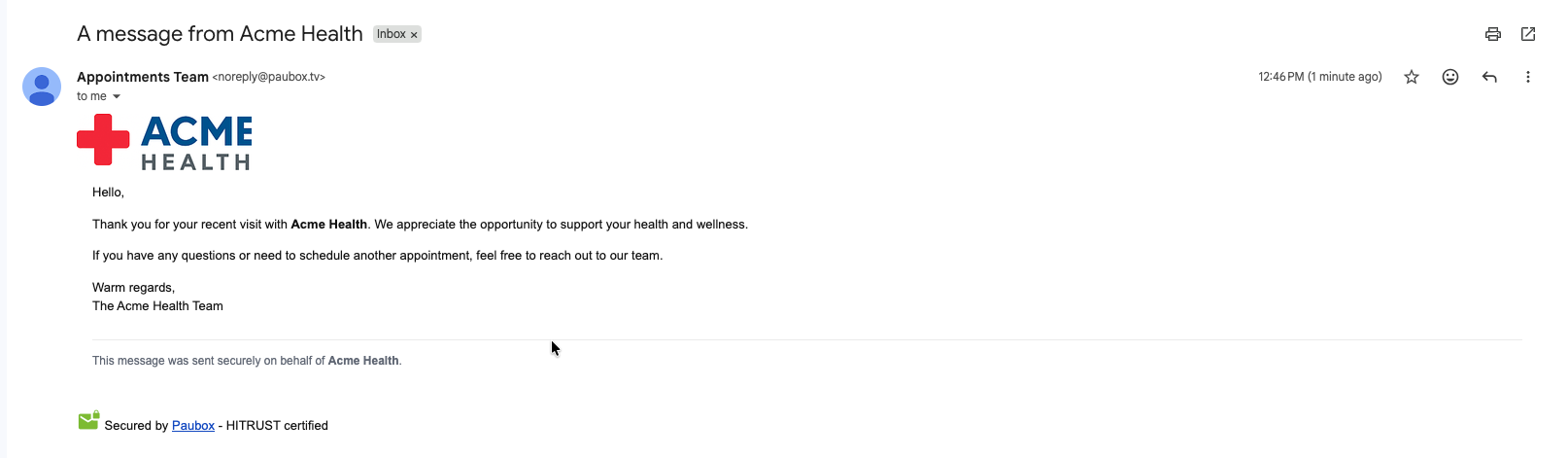
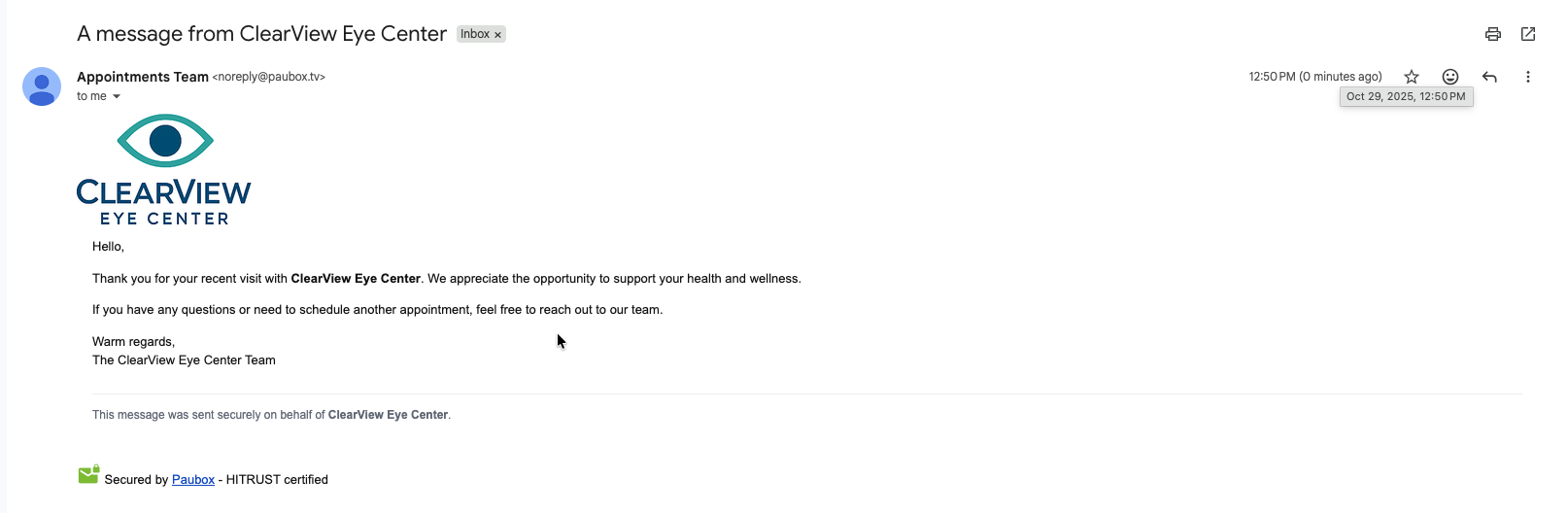
Each recipient received a branded, secure email personalized on behalf of each customer, and each email was sent from your own domain.
