


.svg)
.svg)
.svg)
.svg)
.svg)
.svg)
.svg)
.svg)
.svg)
.svg)
.svg)
.svg)
.svg)
.svg)
.svg)
.svg)
.svg)
.svg)
.svg)
.svg)
.svg)


According to an IBM Research Report on the topic of DKIM and the use of digital signatures, “The concept behind DKIM is simple If you and I have an agreement that we always digitally sign our email to each other, then we can always be sure when one of us has sent the other a legitimate email, or when someone is trying to pretend to be one of us,”
DKIM, or DomainKeys Identified Mail, is an email authentication method designed to protect against email spoofing. It works by adding a digital signature to the email header, which is created using the sender's private key. When the email is received, the recipient's email server retrieves the sender's public key from the DNS (Domain Name System) and uses it to verify the signature.
If the signature matches, it confirms that the email was indeed sent by the claimed domain and that the content has not been altered. The purpose of the methods is to validate the authenticity and integrity of emails, reducing the risk of phishing and other malicious activities. When looking at it from the perspective of emails sent by healthcare providers, it provides one of the first and most basic steps towards the end goal of HIPAA compliant email.
How it works
DKIM is like a contract between the user and sender, providing a certainty that the emails sent are from the right recipient.
This is how it works:
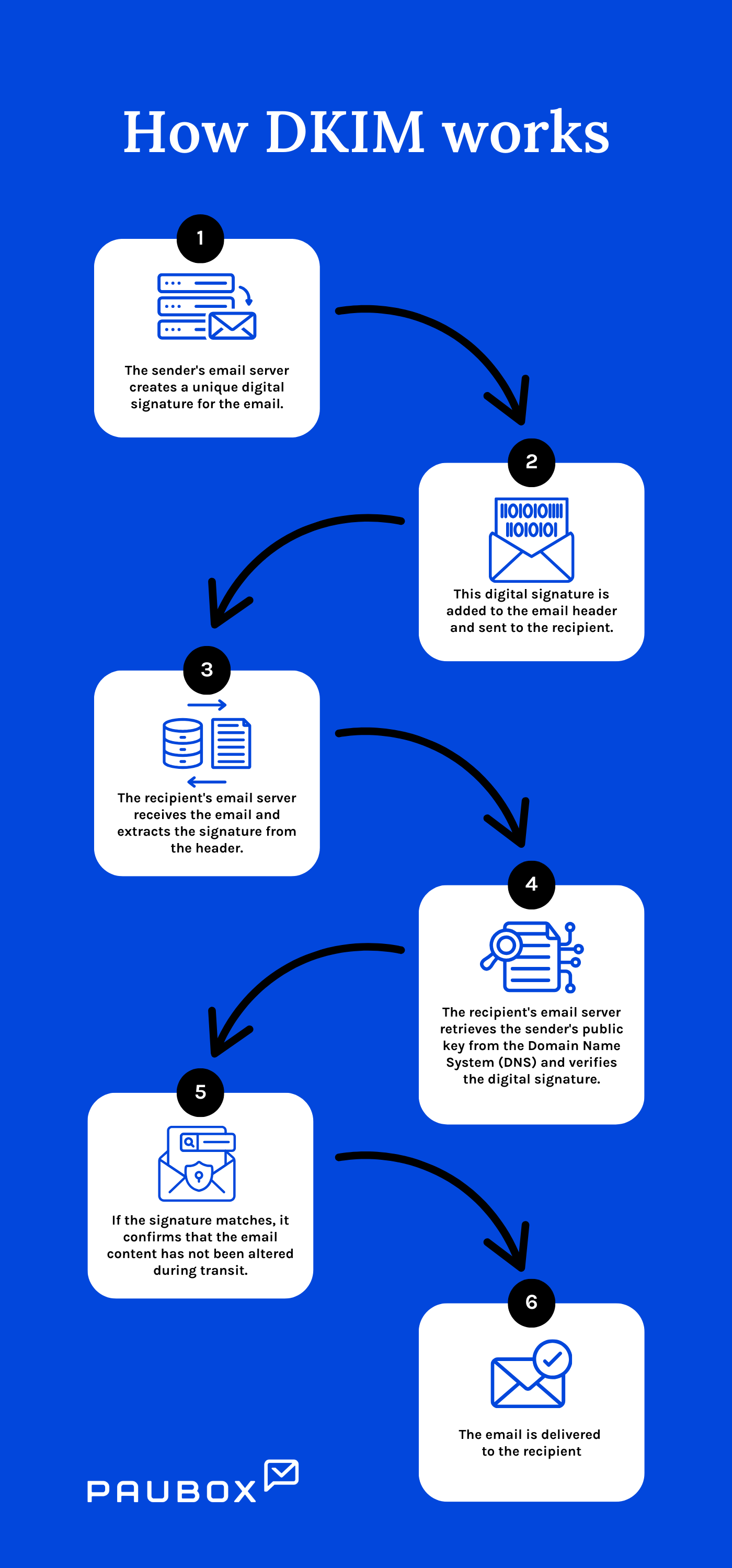
- The sender's email server creates a unique digital signature for the email using the sender's private key.
- This digital signature is added to the email header.
- The email is sent to the recipient with the signature included in the header.
- The recipient's email server receives the email and extracts the signature from the header.
- The recipient's email server retrieves the sender's public key from the Domain Name System (DNS).
- Using the public key, the recipient's email server verifies the digital signature.
- If the signature matches, it confirms that the email was sent by the claimed domain and that the content has not been altered during transit.
- The email is delivered to the recipient with a verified assurance of authenticity and integrity.
How to set up a DKIM record
A DKIM record is a piece of code stored in your domain's DNS settings that contains your public key. Receiving email servers use this key to verify that your emails are authentic.
Paubox support offers the following guidance on how to set up a DKIM Record through Paubox:
- Log in to your Paubox dashboard (https://www.paubox.com/users/sign_in)
- In the left-hand navigation menu, click Overview
- In the DKIM Configuration row, click Open Settings
- Select your domain in the dropdown menu and click Generate DKIM Key
- Login to your domain host and add a new DNS record using the DKiM Key values generated on your Paubox dashboard (the values in your dashboard are unique to you and your domain)
- Toggle "DKIM Enabled" to Yes (make sure Step 5 is completed before toggling to Yes)
The difference between DKIM1024 and DKIM2048
The difference between DKIM1024 and DKIM2048 lies in the length and strength of the encryption keys used for signing emails. DKIM1024 uses a 1024-bit key, while DKIM2048 uses a 2048-bit key. The longer 2048-bit key provides stronger encryption, making it much more secure and resistant to cryptographic attacks. This means emails signed with DKIM2048 are much harder to forge or tamper with than those signed with DKIM1024.
As email security threats continue evolving, using DKIM2048 is recommended because it offers enhanced email protection. Although DKIM2048 requires more processing power and might take slightly longer to verify, its improved security makes it a better choice for protecting sensitive information.
See also: Top 12 HIPAA compliant email services
FAQs
How do I know if an email has been DKIM signed?
You can check the email headers for a DKIM-Signature field.
Do all email providers support DKIM?
Most major email providers support DKIM, but not all. It's best to check with your provider.
Can DKIM alone protect my emails?
No, DKIM is part of a broader email security strategy.
