


.svg)
.svg)
.svg)
.svg)
.svg)
.svg)
.svg)
.svg)
.svg)
.svg)
.svg)
.svg)
.svg)
.svg)
.svg)
.svg)
.svg)
.svg)
.svg)
.svg)
.svg)


A prospect reached out to us this week regarding the possibility of integrating the Paubox Email API with Adobe Experience Manager (AEM) Forms. This post is about how to integrate the Paubox Email API with AEM Forms.
SEE ALSO: Integrating Adobe Campaign Classic with the Paubox Email API
Adobe Experience Cloud (AEC)
The Adobe Experience Cloud (AEC) is a collection of integrated online marketing and web analytics products. Adobe's aim is to create a single integrated solution for Customer Experience Management (CXM). AEC was previously known as the Adobe Marketing Cloud (AMC). Adobe Experience Cloud includes the following eight solutions:- Adobe Analytics
- Adobe Audience Manager
- Adobe Experience Manager
- Adobe Campaign
- Adobe Advertising
- Adobe Target
- Adobe Commerce Cloud
- Marketo Engage
Adobe Experience Manager (AEM) Forms
Adobe Experience Manager Forms, or AEM Forms, is itself a component of Adobe Experience Manager. AEM Forms is marketed as an easy-to-use solution to create, manage, publish, and update complex digital forms while integrating with back-end processes, business rules, and data.
Integrating Secure Email with AEM Forms
In the case of the prospect we spoke to, they had a special business requirement for AEM Forms: They needed to have the form data sent via secure email. Due to the fact they are affiliated with the healthcare industry, the form data will contain protected health information (PHI). As we've discussed at length, the presence of PHI in an email means that message must be HIPAA compliant. After some research, we found a way to integrate the Paubox Email API with Adobe Experience Manager 6.4 Forms, which appears to be an on-premise solution. As of this writing, it is assumed the same configuration options are available with AEM Forms, which is a cloud-based service. We were not able to access a demo version of AEM Forms, nor were we able to find any configuration options for it. Here's how to do it:
Part I: Sign up for the Paubox Email API
The recommended solution for configuring AEM Forms with the Paubox Email API is to use the SMTP Server option. Click here to get started
Part II: Configure Adobe Experience Manager Forms
Once you have your Paubox Email API credentials in place, you will next configure AEM Forms to send secure email via Paubox. This is accomplished by configuring the Day CQ Mail Service. This can be done by pointing your browser to Felix Configuration Manager (this link points to localhost).
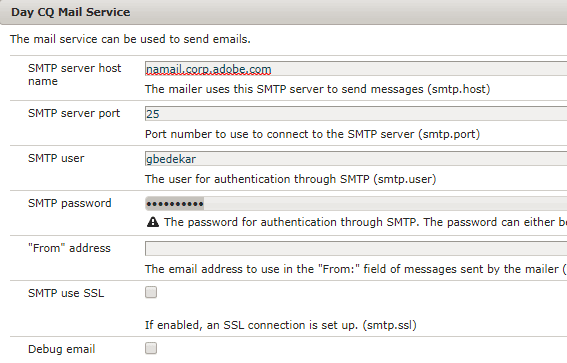
Using the above screenshot as guidance, adjust the following settings:
- SMTP server host name: api.paubox.com
- SMTP server port: 25
- SMTP user: [yourusername]@api.paubox.com
- SMTP password: [assigned to you upon signing up for Paubox]
- SMTP use SSL: [this box must be checked]
To complete the configuration, click Save. Congratulations! You are now ready to send secure email from Adobe Experience Manager Forms via the Paubox Email API.
